
Credits History
4 min
Credits History Summary
The Credits History page shows a complete log of all credit changes on your account, including both credits added and credits deducted. Use this page to understand where your credits came from, how they were used, and when each transaction happened.
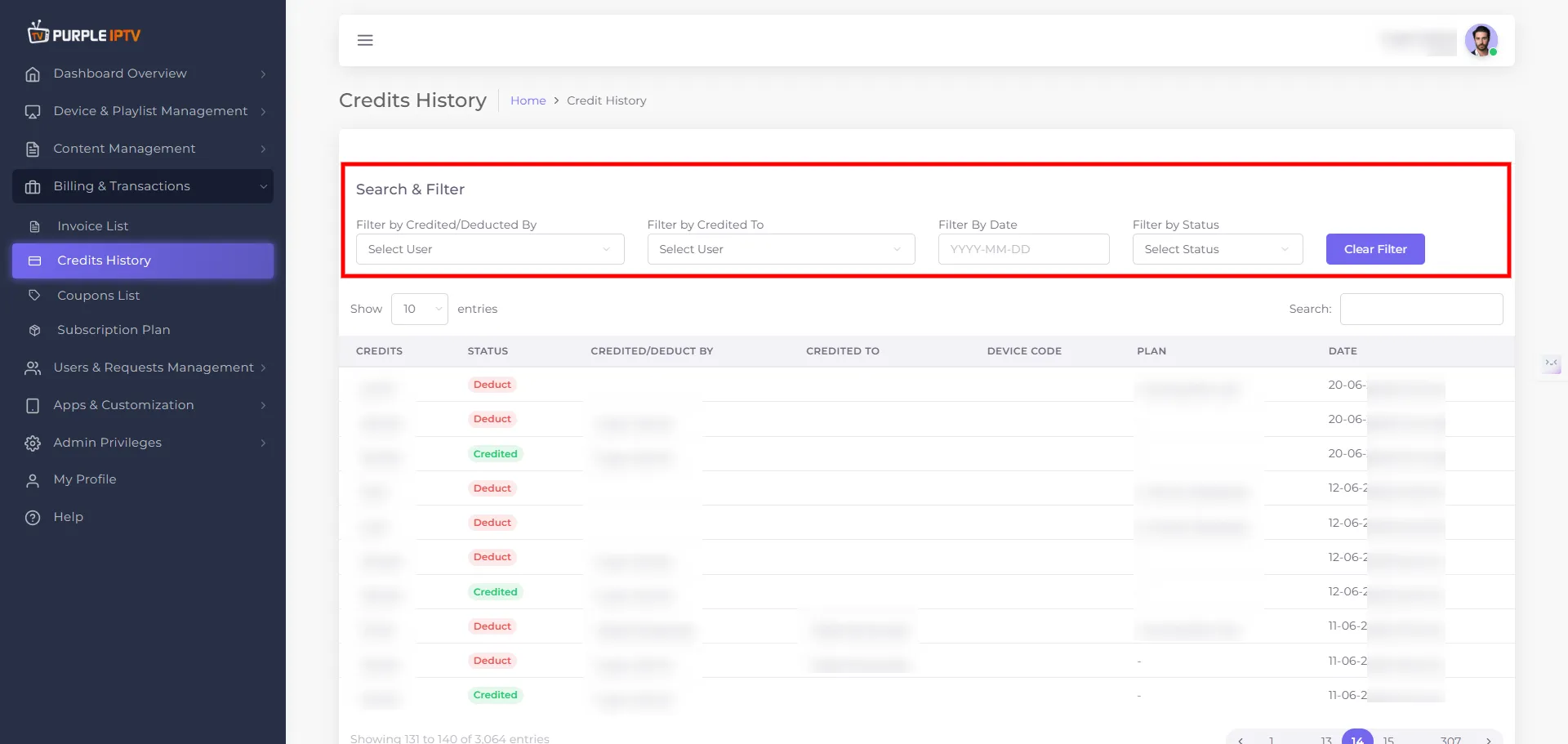
Use this section to quickly find specific transactions.
1. Filter by Credited/Deducted By
- Field label - Filter by Credited/Deducted By
- Type - Dropdown user selector.
- What it does - Shows transactions based on who performed the credit action.
- Example values - Super Admin, admin, RESELLER, etc.
2. Filter by Credited To
- Field label: Filter by Credited To
- Type: Dropdown user selector.
- What it does: Shows transactions based on which user received or lost credits.
3. Filter by Plan
- The plan or product related to the transaction, when applicable.
- Examples: MonthlyPlan-QA, 6 Month [Reseller].
- Useful to understand why credits were deducted (e.g. purchase of a 6‑month reseller plan).
4. Filter by Date
- Field label: Filter By Date
- Type: Date (or date range) selector.
- What it does: Limits the list to transactions that happened on a given date or within a selected period.
5. Filter by Status
- Field label: Filter by Status
- Type: Status dropdown.
- Available statuses:
- Credited – credits were added.
- Deduct – credits were removed.
6. Search
- Search box- Free‑text search that scans across visible columns.
- Useful to quickly find a specific amount, plan name, or device code.