
Device List
The Device List page is where all devices and activation codes are displayed for both users and resellers.
It shows important information such as the activation code, creation date, expiry date, who created it, and whether it is currently active or expired.
You can search and filter devices by user or status to quickly find the right device.
Every device is linked to an activation code that must be entered in the IPTV app. When the code expires, the device stops working until renewed.
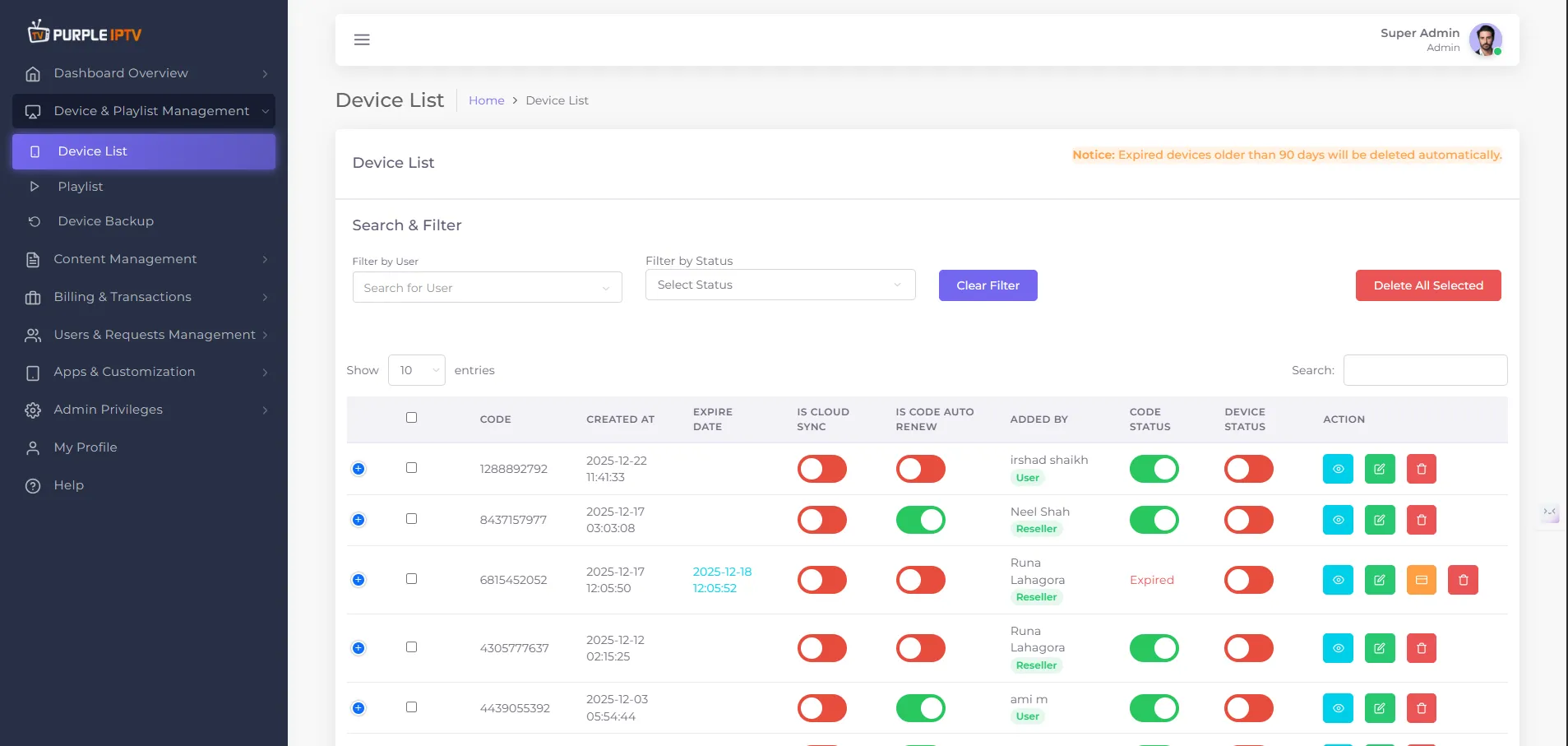
1. Device List (Purple Panel)
The Device List in Purple Panel shows all the devices and activation codes created for users. Each row in this list represents one device.
- Code The activation code for the device. The user enters this code in the IPTV app to activate their device.
- Created at The date and time when the device/code was created in Purple Panel.
- Expire Date The date and time when the device/code will stop working.
- Is Cloud Sync Shows if this device uses cloud sync (if this feature is enabled).
- Is Code Auto Renew Shows if the activation code will be renewed automatically at expiry.
- Added by Shows which user created the device/code.
- Code Status / Device Status Shows if the device is Active or Expired.
- Action Buttons or links used to view or manage the device (for example: edit, delete, or other options allowed by Purple Panel).
2. Automatic Deletion of Expired Devices
In Purple Panel there is an important notice -
Expired devices older than 90 days will be deleted automatically.
This means:
- When a device becomes Expired, it stays visible in the Device List for 90 days.
- After 90 days, Purple Panel automatically deletes that expired device from the system.
3. Search and Filters in Device List
At the top of the Device List, Purple Panel provides tools to quickly find devices -
- Filter by User Type or select a user to show only that user’s devices.
- Filter by Status Choose a status such as Active or Expired to see only devices with that status.
- Show Entries (10 / 25 / 50 / 100) Choose how many devices are shown per page.
- Search A search box where you can type part of a code, a user name, or other visible data to find a specific device.
4. Device Codes and Activation (Purple Panel)
When a new device is created in Purple Panel, the system generates an activation code.
- Purple Panel shows the activation code and the Valid Until date and time.
- The user must enter this activation code in the IPTV app on their device to connect to Purple Panel and start using the service.
- When the Valid Until time passes, the code expires and the device stops working unless:
- the code is renewed, or
- a new device/code is created.
After viewing the activation code, the user can click Back to Device List to return to the main list of devices in Purple Panel.